























































Download Quattrocento Sans Font


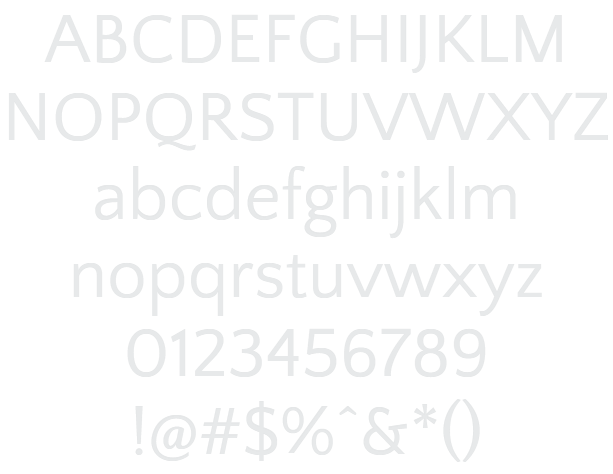
Quattrocento Sans Example

Download Quattrocento Sans - 9.733 downloads

Designed by Pablo Impallari
Classic Elegant Sans Serif Plain Lovely Clean Quattrocento Sans Example Quattrocento Sans Character Map

Create a Logo Using Quattrocento Sans

Gold Trim Logo Style
Simple Logo Style
Dragon Logo Style
Plastic Logo Style
iText Logo Style
Spaced Out Logo Style
Studio 54 Logo Style
Conan Logo Style
Blinkie Logo Style
Stranger Logo Style
Bad Acid Logo Style
Glowing Steel Logo Style
Happy New Year Logo Style
Scavenge Logo Style
Vampire Logo Style
Invaders Logo Style
Gunmetal Logo Style
Chick Flick Logo Style
Neon Logo Style
Dark Magic Logo Style
Alien Glow Logo Style
PURPLE GIRL Logo Style
Achilles Logo Style
Flaming Logo Style
Gelatin Logo Style
Rage Logo Style
Glowing Hot Logo Style
Romance Logo Style
Felt Logo Style
Hot Logo Style
White Logo Style
Outline Logo Style
Groovy Logo Style
Fire Logo Style
Ice Cube Logo Style
Particle Logo Style
Graffiti Creator Logo Style
Embossed Logo Style
Gradient Bevel Logo Style
Chrome Two Logo Style
Spring Logo Style
Super Scripted Logo Style
Skate Logo Style
Legal Logo Style
Neon Glow Logo Style
Candy Stripe Logo Style
Cupid Logo Style
Keen Logo Style
Glitter Logo Style
Glossy Logo Style
Princess Logo Style
TROY Logo Style
Supernova Logo Style
Iced Logo Style
Chromium Logo Style
Snowman Logo Style
Galactica Logo Style
3D Outline Textured Logo Style
Gold Outline Logo Style
Fun Logo Style
Apollo 11 Logo Style
Gold Bar Logo Style

Quattrocento Sans Example

Quattrocento Sans Example

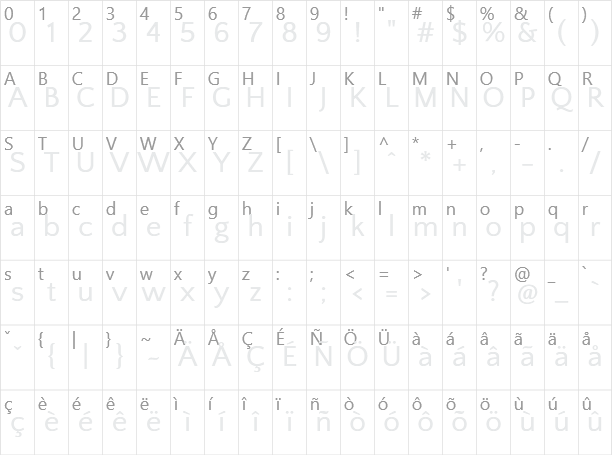
Quattrocento Sans Character Map

Quattrocento Sans Character Map

Added on Donnerstag, 4. August 2011
9.733 downloads
Designed by Pablo Impallari

Similar Fonts

DejaVu Serif Font DejaVu Sans Font Quicksand Font Royal Acidbath Font Negotiate Font

Font Installation Instructions


You may need to extract the .ttf files from a .zip archive file before installing the font.

Windows (XP/Vista/7/8/10)

Right-click on the .ttf file and select install.

MacOS X (10.3 or later)

Double-click on the .ttf file and select install.


Generator Categories

Most Popular Animated (7) Black (13) Blue (17) Brown (8) Burning (6) Casual (5) Chrome (11) Classic (5) Distressed (22) Elegant (11) Fire (6) Fun (10) Girly (7) Glossy (16) Glowing (20) Gold (19) Gradient (6) Gray (8) Green (12) Heavy (19) Holiday (6) Ice (6) Medieval (12) Metal (8) Neon (5) Orange (10) Outline (31) Pink (14) Purple (15) Red (25) Retro (7) Rounded (22) Science-Fiction (9) Script (5) Shadow (10) Sharp (6) Shiny (9) Space (8) Sparkle (7) Stencil (6) Stone (7) Trippy (5) Valentines (6) White (7) Yellow (15)